@tecsafe/widget-sdk
Widget SDK
The TECSAFE Widget SDK embeds TECSAFE widgets (product configurator, layout editor and project app) and handles iframe communication and customer JWT management. The full API documentation is available at tecsafe.github.io/widget-sdk.
Installation
npm install @tecsafe/widget-sdk
⚠️ Register all required event handlers before starting any widget. Register them on the manager immediately after construction, before calling
createProductDetailWidget(),createCustomPageWidget()oropenFullScreen(). These methods throw if a required handler is missing. See Required event handlers for the complete list and responses.
Initializing the SDK
Instantiate one TecsafeWidgetManager per page, after obtaining any required customer consent.
The constructor takes two arguments: a customer token callback and a WidgetManagerConfig.
Cart operations use the event API described below.
import { TecsafeWidgetManager, WidgetManagerConfig } from '@tecsafe/widget-sdk'
import { registerShopEvents } from './tecsafe-events'
const manager = new TecsafeWidgetManager(
async (oldToken?: string) => {
const response = await fetch('/tecsafe/saleschannel-customer-token', {
method: 'POST',
headers: { 'Content-Type': 'application/json' },
body: JSON.stringify({ oldToken }),
})
if (!response.ok) throw new Error('Could not obtain the customer token')
const json = await response.json()
return json.token
},
new WidgetManagerConfig({
trackingAllowed: true, // Set according to the customer's consent.
language: 'en-US',
currencyCode: 'EUR',
priceMode: 'gross',
taxCategories: { S: 19, AA: 7 },
tecsafeArticles: [{ productNumber: 'TS-1', price: '59.50' }],
})
)
// Required: register all three handlers before starting widgets.
// Implemented in tecsafe-events.ts below.
registerShopEvents(manager)
const container = document.getElementById('product-detail-widget')
if (!container) throw new Error('Widget container not found')
const widget = manager.createProductDetailWidget(container, 'SKU-123456')
Required event handlers
The manager requires an active handler for each of these requests:
| Request to handle | Response to send |
|---|---|
IN_MESSAGES.InMessageRequestArticleInfo (request-article-info) |
OUT_MESSAGES.OutMessageArticleInfo (article-info), once per requested article |
IN_MESSAGES.InMessageRequestLayoutPrices (request-layout-prices) |
OUT_MESSAGES.OutMessageLayoutPrices (layout-prices), echoing requestId |
IN_MESSAGES.InMessageCartPunchout (cart-punchout) |
OUT_MESSAGES.OutMessageCartPunchoutResult (cart-punchout-result), once for the entire transfer |
Always initialize the integration in this order:
- Construct the manager with the token callback and configuration.
- Register all three handlers with
manager.on(...)using the shop integration example. - Create the product/custom-page widget or open fullscreen.
Register the handlers synchronously, even when the handlers themselves perform asynchronous work.
A fullscreen URL restored on page load opens in a microtask after construction, so register handlers
immediately after constructing the manager, before an await or other deferred setup.
createProductDetailWidget(), createCustomPageWidget() and openFullScreen() validate the required
handlers on every call, before creating or opening the widget. Missing handlers cause an Error
listing every missing event and explaining how to register them. For example:
Missing required event handlers: cart-punchout, request-article-info, request-layout-prices. Register each handler with manager.on(IN_MESSAGES.<message>, handler) before creating or opening a widget.
Use on() for persistent integrations. If the last handler is removed with off() or consumed by
once(), register it again before starting another widget. Keep the handlers registered while
widgets are running so requests can still be processed. Registration is required even when there
are no matching articles or the host cart is unavailable: respond with info: null or
{ success: false } as appropriate.
The debug console created by createDebugWidget() is exempt from these business-event checks so
it can be used to troubleshoot an incomplete integration. It still requires debugWidget: true.
Widget events
IN_MESSAGES contains requests from widgets to the host shop. OUT_MESSAGES contains messages
from the host shop to widgets. The SDK handles internal messages such as token requests itself.
Business events must be handled by your application. Reply with e.respond(...) to target the
requesting widget; manager.emit(...) broadcasts to all widgets.
Shop integration example
Create tecsafe-events.ts with your application's event handlers. The example endpoints below
represent routes you implement in your own backend. They must authenticate the customer and apply
your shop's pricing and cart rules.
import {
TecsafeWidgetManager,
IN_MESSAGES,
OUT_MESSAGES,
ArticleInfo,
LayoutPricesResponse,
} from '@tecsafe/widget-sdk'
export function registerShopEvents(manager: TecsafeWidgetManager): void {
manager.on(IN_MESSAGES.InMessageRequestArticleInfo, async (e) => {
await Promise.all(
e.event.articles.map(async (article) => {
const response = await fetch('/tecsafe/article-info', {
method: 'POST',
headers: { 'Content-Type': 'application/json' },
body: JSON.stringify(article),
})
const info: ArticleInfo | null = response.ok
? await response.json()
: null
// Echo the complete identifier, including every supplied field.
e.respond(OUT_MESSAGES.OutMessageArticleInfo.create({ article, info }))
})
)
})
manager.on(IN_MESSAGES.InMessageRequestLayoutPrices, async (e) => {
let prices: LayoutPricesResponse
try {
const response = await fetch('/tecsafe/layout-prices', {
method: 'POST',
headers: { 'Content-Type': 'application/json' },
body: JSON.stringify(e.event),
})
if (!response.ok) throw new Error('Could not calculate layout prices')
// The backend must preserve requestId and serviceIds.
prices = await response.json()
} catch {
prices = {
requestId: e.event.requestId,
success: false,
error: 'Could not calculate layout prices',
}
}
e.respond(OUT_MESSAGES.OutMessageLayoutPrices.create(prices))
})
manager.on(IN_MESSAGES.InMessageCartPunchout, async (e) => {
let success = false
try {
const response = await fetch('/tecsafe/cart-punchout', {
method: 'POST',
headers: { 'Content-Type': 'application/json' },
body: JSON.stringify(e.event),
})
success = response.ok // Return success only when the complete cart transfer succeeded.
} catch {
// Report transport failures to the widget too.
}
e.respond(OUT_MESSAGES.OutMessageCartPunchoutResult.create({ success }))
})
}
Article information
Each request-article-info payload contains articles: ArticleIdentifier[]. An identifier contains
at least one of gtin, manufacturerArticleNumber or supplierArticleNumber.
Reply once per requested article with { article, info }. Send info: null when details are
unavailable so the widget can show its fallback promptly.
const info: ArticleInfo = {
hostShopArticleNumber: 'HOST-123', // Used in cart punchout.
availableStock: true, // Optional; omit when availability is unknown.
taxCategory: 'AA',
priceScales: [
{
fromQuantity: 1,
unitPrice: '38.50',
allowancesAndCharges: [
{ reasonText: 'Summer-Rebate', type: 'percentage', value: '5' },
],
effectiveUnitPrice: '36.58',
},
],
images: ['https://shop.example/product.png'],
downloads: ['https://shop.example/manual.pdf'],
}
Images and downloads are optional arrays of URL strings. Protect your article lookup API with appropriate rate limits.
Layout prices and session settings
request-layout-prices contains a requestId, layout with priceScales and taxCategory, and
tecsafeServices. Each service includes its ID, localized title, category, mandatory flag, tax
category, and unit pricing. The incoming TECSAFE prices are always net EUR, including any
TECSAFE allowances and charges.
Reply with layout-prices, preserving requestId and each service's serviceId. Convert the
layout's quantity scales and service prices for the current customer. Preserve existing allowances
and charges and include any shop adjustments. Service responses require pricing and the service ID;
titles, categories and mandatory flags do not need to be repeated.
Always respond, including when a calculation, tax lookup, or backend request fails. Send
{ requestId, success: false }, optionally including a customer-safe error string, and omit
layout and tecsafeServices. Catch application errors in the handler as shown above; the SDK
does not automatically turn thrown errors into responses. A failure uses the same layout-prices
message and original requestId so the widget can stop waiting and report that pricing is
unavailable instead of treating the request as successful or using zero prices.
Successful responses may include success: true; omitting it remains supported for existing
integrations. Consumers must check response.success === false before accessing prices. The
exported LayoutPricesSuccessResponse and LayoutPricesFailureResponse types describe each
outcome, and LayoutPricesResponse is their union. Widgets must support the failure outcome
before a shop starts sending it.
Article info, layout price responses and cart punchout use the session's configured currencyCode,
priceMode (gross or net) and tax categories. Tax category codes such as S and AA refer to
taxCategories; shop-specific codes can be configured in additionalTaxCategories. When returning
gross layout prices, include the corresponding taxCategory on the layout and services. Configure
these session settings consistently with the widget's init configuration. Prices and tax settings
are assumed to agree with that configuration; they are not independently negotiated in each event.
Monetary unit prices and adjustment values use decimal strings. Every quantity scale contains
fromQuantity, unitPrice, allowancesAndCharges, and effectiveUnitPrice.
Cart punchout
cart-punchout replaces the previous constructor callback and add-to-cart/added-to-cart messages.
It carries { positions, tecsafeTotal }. Each position includes:
- An opaque
positionId, itsparentPositionId(null for a layout), and a type:layout,tecsafeService, orhostShopArticle. - Article
identifiers, localizeddescription, and aquantitywith its relation to its parent (per-parent-unit,once-per-parent, orindependent), value, total and unit of measure. pricingwith unit price, allowances and charges, effective unit price, and line amount; plus itstaxCategory.- Optional
meta, including material dimensions and colors, image URLs and item counts.
tecsafeTotal is a number; position quantities and monetary amounts are strings. The exported
CartPunchoutRequest and CartPunchoutPosition types describe the complete payload.
Respond once with OUT_MESSAGES.OutMessageCartPunchoutResult.create({ success }) after processing
the entire transfer. The response is a normal widget event; it carries no HTTP status code.
Customer tokens
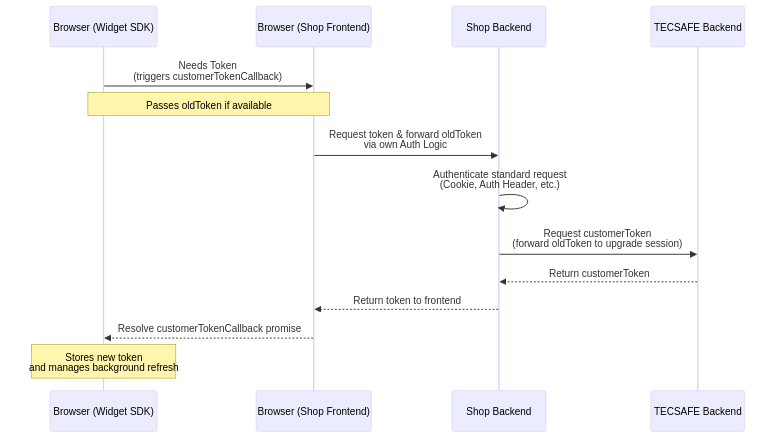
Your token callback should call an authenticated route in your backend. That route requests a
customer token from TECSAFE's
/jwt/saleschannel-customer endpoint.
Forward the callback's oldToken to TECSAFE when present so guest assets and customer sessions can
be merged or upgraded correctly. The customer user ID must be unique within your sales channel;
search tags can be used for customer groups and access rights.
When the customer's login status changes, refresh the token:
await manager.refreshToken()
// Or provide a token already fetched by your application:
await manager.refreshToken('<new-token>')
The SDK caches tokens, refreshes them before expiry, and propagates new tokens to its widgets.
Cleanup and SPA lifecycle
Destroy the widget when leaving a page, or destroy all widgets when withdrawing consent or
unmounting the integration. destroyAll() also clears token refresh timers and removes the debug
overlay. Manager event registrations remain available if the manager is reused.
widget.destroy()
// Or:
await manager.destroyAll()
For Vue, reuse the token callback, configuration and registerShopEvents above:
<template>
<div ref="container" />
</template>
<script lang="ts" setup>
import { onMounted, onBeforeUnmount, ref } from 'vue'
import { TecsafeWidgetManager } from '@tecsafe/widget-sdk'
import { registerShopEvents } from './tecsafe-events'
import { tokenCallback, widgetConfig } from './tecsafe-config'
const container = ref<HTMLElement | null>(null)
let manager: TecsafeWidgetManager | null = null
onMounted(() => {
if (!container.value) throw new Error('Widget container not found')
manager = new TecsafeWidgetManager(tokenCallback, widgetConfig)
registerShopEvents(manager) // Register every required event before creating the widget.
manager.createProductDetailWidget(container.value, 'SKU-123456')
})
onBeforeUnmount(() => {
void manager?.destroyAll()
})
</script>
Debug tooling
Two development helpers are available through WidgetManagerConfig: debugWidget: true enables
createDebugWidget(element), and sdkDebugger: true injects a collapsible communication overlay.
Both default to false and should be disabled in production.
The debug widget can be created without business event handlers to troubleshoot an integration.
Calling createDebugWidget() without the configuration flag throws an error.
The overlay logs incoming and outgoing messages, can send arbitrary messages to a selected widget,
and can reset a widget. It uses a shadow root, and destroyAll() removes it.
Every message definition in IN_MESSAGES and OUT_MESSAGES exposes a preset() function for debug
payloads; payload-free messages return null.
const example = OUT_MESSAGES.OutMessageLayoutPrices.preset()